
The Complete Campus Creator Toolkit: Best Editing, Analytics, and Scheduling App
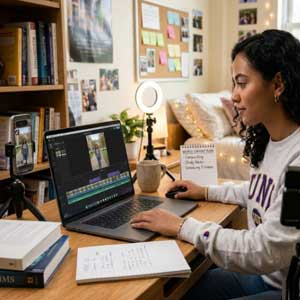 For creating a sustainable short-form video presence between courses, the software stack isn't as complicated or as full-featured as one would expect in an enterprise offering, and it doesn't have to be costly. Students who combine the editing, analytics, and scheduling of their content into three separate tools are saving hours per week without compromising their audience growth.
We've seen a lot of creator roundups that compile inflated lists of 30 apps, but our analysis of students' workflows shows that the opposite is also true: Tool sprawl is a death sentence to consistency. The Circle 2026 Community Trends Report shows that 45% of active creators are actively consolidating their tech stacks to remove operational drag. The streamlined, efficient set of must-have tools for TikTok creators on a campus schedule and budget.
Why Student Creators Need an Integrated Workflow
Short-form video is young adults' main discovery method. According to Pew Research Center, 63% of U.S. adults under 30 are active users of TikTok, and college campuses are an ideal environment for digital storytelling and personal branding.
But, for student creators, there are definite time and budget limitations. If all apps in your mobile device or computer have to pay for their space by doing repetitive tasks or provide meaningful performance information, then you have to balance coursework, exams and content production.
Best Editing Apps for Fast Dorm-Room Production
The right editing program removes the hassle from shooting on campus and posting high-quality vertical footage.
- CapCut: CapCut is created by ByteDance, and it is still the fastest video editor for mobile and desktop devices for vertical videos. It allows students to edit a 60-second clip between classes using its auto-captioning, beat-sync templates, and background removal features. It is worth noting that the free version will now have a minor watermark on the end frame unless you customize the ending frame or opt for a paid version.
- VN Video Editor: If you are looking for a multi-track timeline editor without paying a subscription cost, VN Video Editor provides students with keyframe animation features, custom LUT colour grading, and no watermarks on the free version.
- TikTok Studio: Native in-app editing has come a long way. When using TikTok Studio, your audio levels and aspect ratios will be directly optimized to the compression standards used in TikTok, eliminating any external rendering delays.
Best Analytics Tools to Decode Audience Retention
You don't want to post blindly and use up precious study time—analytics tools tell you which hooks will get viewers to stay.
- TikTok Creator Center & Search Insights: If you're considering investing in third-party software, get to know your built-in dashboard first. With Creator Search Insights, you can get live search queries in your niche so that you can script videos based on the current search demand of your students and viewers.
- Metricool: At a student-centric price, widely loved by Reddit creator communities for enterprise-level cross-platform reporting, Metricool monitors follower growth, average watch time, and competitor performance all in a neat dashboard.
- vidIQ: The short-form trend alerts and keyword research tools within vidIQ help creators leverage campus vlogs and education videos for maximum search discovery, originally built for long-form video.
Best Scheduling Apps for Exam-Week Consistency
Algorithms like being fed a steady stream of content, even during midterms.
- TikTok Native Web Scheduler: The native scheduler allows you to schedule 10 days ahead, add captions, and upload videos without any cost through the use of desktop browsers.
- Later & Buffer: Both provide visual content calendars and the best time to post based on when your particular followers are online.
Frequently Asked Questions
1. Are college content creators able to create a successful channel without having to pay for any applications? Yes. The integration of either TikTok Studio or VN Video Editor for no-watermark video editing with web-scheduler and Creator Search Insights from TikTok creates a full zero-budget pipeline.
2. Does using a third-party scheduler application decrease the video reach? No, as third-party schedulers use the APIs of the official platform and do not impact video reach. But as commercial music licensing restricts access to the API audio, videos with popular sounds should be published as drafts.
3. How much time should be spent by a student on analysing the video metrics? Get into the habit of checking your three-second hook retention and sources of search traffic each Sunday and make adjustments to your scripts for the week ahead.
Create a long-term Digital Portfolio
Think of your channel as a living CV. In fact, according to Boston Consulting Group creator economy research, digital content creators now shape the purchase decisions of more than 30% of consumers all over the world, and the creation of content has become a highly prized career skill. Use a short-form video editing and scheduling app for students, and safeguard your focus on your studies while creating a resource that'll help your students start their careers after graduation.
Current Issue